

Free Option Trading Journal: Log Calls, Puts, and Spreads
A free option trading journal for stocks and options. Log legs, expiries, and premiums, then review P&L, win rate, and strategy results without a credit card.
An options book is harder to review than a stock book. Each trade has an expiry, a strike, a premium, and often more than one leg. A spreadsheet cell labelled P&L does not tell you whether the credit spread, the long call, or the weekly expiry is carrying the account. A free option trading journal is a structured log of those fields plus a review loop you will actually open after a losing week.
What a free option trading journal is for
The job of the journal is not to place orders. It is to answer four questions on Sunday: Which strategies paid after fees? Which underlyings keep stopping you out? How much theta and expiry risk are you holding overnight? Did you size the trade before you clicked buy?
- Keep each strategy as one position (a spread is one trade, not two unlinked tickets)
- Record strike, expiry, premium, quantity, and fees at entry
- Mark the position Active while you hold, Closed when you exit
- Review win rate, net P&L, and average result by strategy tag
Fields that stock journals skip
A stock journal can survive on ticker, shares, entry, and exit. Options need more, or your review will mix a 3-lot weekly put with a 1-lot monthly call and call it the same setup.
| Field | Why it matters |
|---|---|
| Underlying | Results cluster by name, not by option symbol soup |
| Strategy | Long call, cash-secured put, bull put spread, and so on |
| Legs | Side, call or put, strike, expiry, premium, quantity |
| Fees | Premia look fine until brokerage and STT show up |
| Status | Open risk versus realized P&L must stay separate |
| Note | One sentence on the thesis so you can audit it later |
Paper, PDF, spreadsheet, or a free journal app
A printed options log works for the first dozen trades. After that you cannot filter last month's credit spreads or sort by days to expiry. Spreadsheets can do it if you maintain every formula. A free online journal stores the same data and computes the review for you.
- Paper or PDF: low friction on day one, no filters or totals
- Spreadsheet: full control, easy to break when you add a new strategy
- Free option trading journal app: structured legs, dashboard P&L, CSV backup
How to review an options week
Do not reread every fill. Filter closed trades for the week, then look at three numbers: net P&L after fees, win rate, and the largest loser. Split the same list by strategy. If long calls are noisy and defined-risk spreads are quiet, that is a process fact, not a vibe.
Weekly options review
- Close leftover positions that already exited at the broker
- Filter closed trades to this week and note net P&L and win rate
- Group by strategy: directional, credit spread, debit spread, hedge
- Check open positions for expiry this week and overnight gap risk
- Write one rule for next week (max lots, no undefined risk, no adding)
SwingTradingLog as a free option trading journal
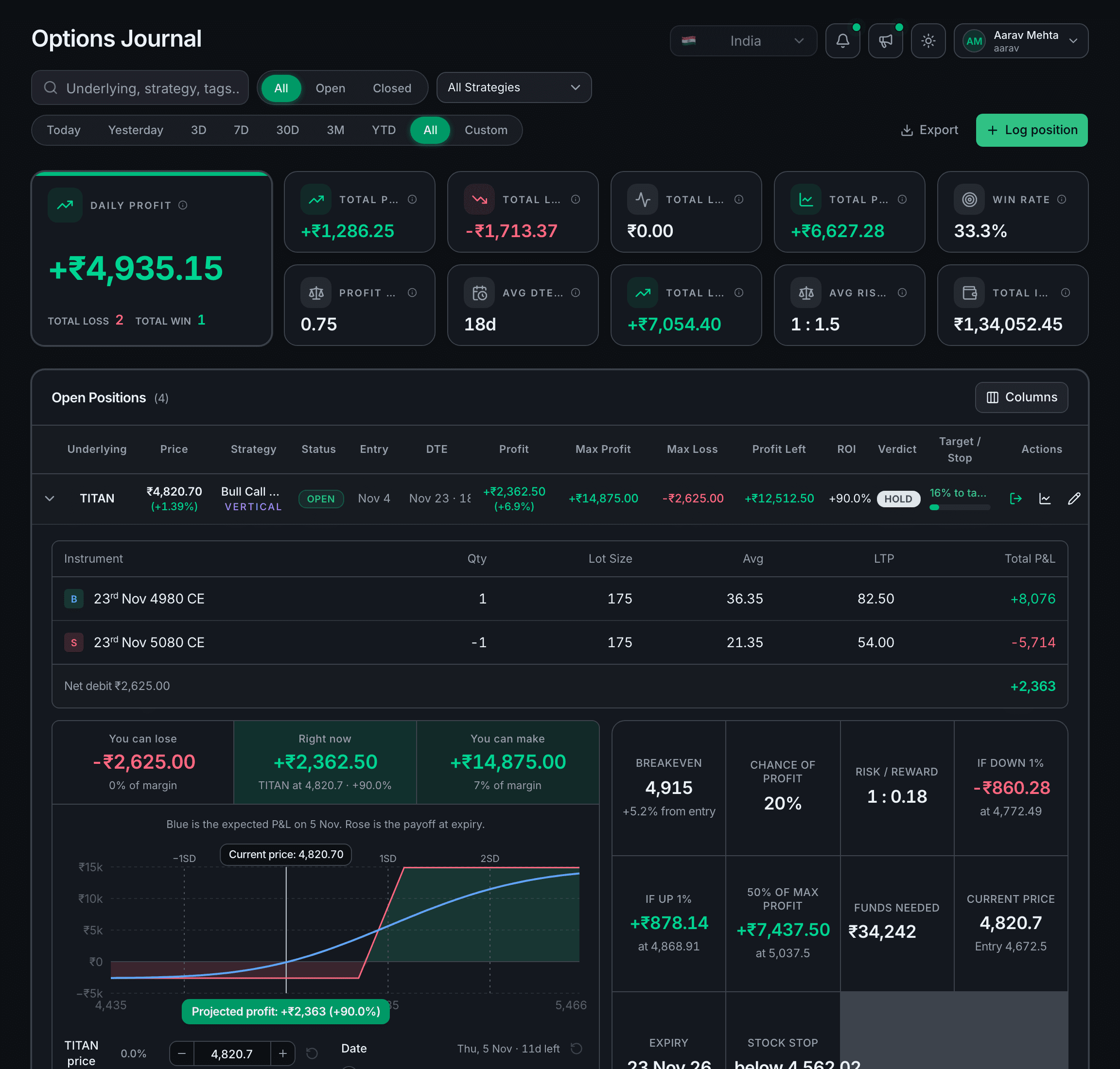
SwingTradingLog is built for stocks and options. You log a position with a strategy template, keep legs together, attach a chart screenshot if you want, and see dashboard P&L as you close trades. Core features are free. There is no credit card to start, and you can export CSV or a JSON workspace backup from Settings.
- Templates for long and short calls and puts, credit and debit spreads, and straddles
- Active versus closed books so open expiry risk does not hide inside realized stats
- Journal metrics such as P&L, win rate, and hold context on the options book
- CSV export and JSON backup when you want a spreadsheet snapshot
Start logging the next options trade
Create a free account, add your next call, put, or spread with strikes and expiry filled in, and close it when you exit. After ten closed trades the journal starts answering the only question that matters: which options structures you should keep running.
If you also hold multi-day stock swings, keep the same Sunday review in How To Start A Swing Trading Journal. For PDF templates versus an online log, see Trading Journal Pdf Vs Free Online Journal. You can preview the options book before you sign in.
Questions about a free option trading journal
Is there a free option trading journal?
Yes. SwingTradingLog is a free option trading journal for stocks and options. You can log calls, puts, and multi-leg strategies, review P&L on a dashboard, and export CSV without a credit card.
What should I log in an options trading journal?
Log the underlying, strategy, each leg (call or put, long or short, strike, expiry, premium, quantity), fees, stop and target if you use them, and a one-line reason for the trade. Close the position when you exit so realized P&L and win rate stay accurate.
Can I journal option spreads, not only single legs?
Yes. SwingTradingLog includes templates for long and short calls and puts, credit and debit spreads, straddles, and related structures. Each position keeps its legs together so you review the strategy, not a pile of unlinked tickets.
Does a free options journal replace my broker?
No. The journal is for logging and review. You still place orders with your broker. Use the journal to see which strategies, expiries, and underlyings actually pay you after fees.
Ready to log your swings? Start free on SwingTradingLog, or explore trading guides and the risk calculator.