SwingTradingLog

Free online trading journal for stock & swing traders

A free trading journal app with live analytics — not just a PDF template. Log stock and day trades, review P&L on the dashboard, export CSV, and track overnight gap risk. Full access free, no credit card.

Why traders use SwingTradingLog

Most traders know they should journal. Fewer keep one after a losing week. SwingTradingLog is a free trading app and stock trading journal built for multi-day holds: log a trade in under two minutes, attach trading chart screenshots, see overnight exposure next to P&L, and review the week with dashboard analytics instead of a brittle spreadsheet.

Whether you run a swing trading strategy on NSE large caps, US growth names, forex pairs, or mixed option trading and equity books, the same workflow applies. Mark trades Active while you hold, close them when you exit, and filter by strategy, tag, or outcome. Indian traders get INR display, session-aware daily P&L, and listing market logic suited to a stock trading journal India workflow without paying for features you never open.

Full access is free: dashboard, journal, goals, analytics, CSV export, workspace backup, and in-app feedback. No credit card. If you started with a trading journal PDF or spreadsheet, you can export anytime and still get live analytics. Read what is swing trading, position sizing, gap risk, and weekly review habits, or preview the app before you sign up.

Built for swing traders who journal seriously

Everything below ships in the free product today. See the full feature list on the features page.

Track every swing trade

Log equities, options, forex, and crypto in one swing trading journal. Record entry and exit, stops, targets, strategy tags, psychology notes, and chart screenshots. Active positions stay separate from closed trades so your trade log app reflects open risk, not just history.

Overnight & weekend gap risk

Multi-day holds mean gap risk while you sleep. SwingTradingLog totals notional on open positions and flags overnight, weekend, and holiday exposure on the dashboard. Use it as an overnight gap risk tracker before you size into Friday holds or earnings week.

Goals & performance analytics

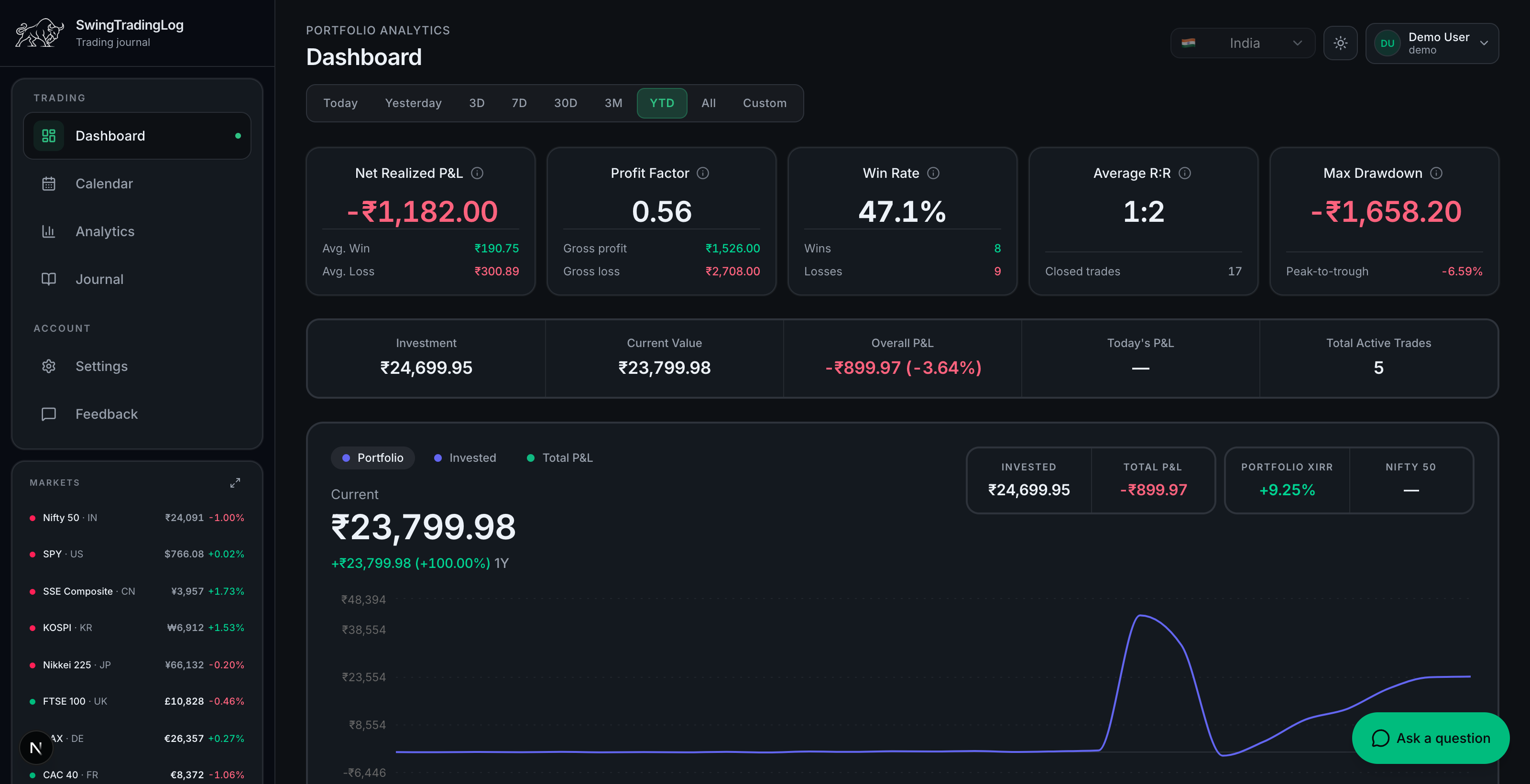
Review net P&L, profit factor, win rate, average R:R, drawdown, and period filters without exporting to a spreadsheet. The Analytics hub adds sector attribution, R-multiple spectrum, and session breakdowns. A built-in P&L tracker keeps weekly review under twenty minutes.

Shareable trade cards

Turn closed trades into branded PNG cards or public share links for social posts. Sharing is optional and can be disabled in Settings. Your journal stays private; only trades you choose to share leave the app.

One journal for swing, day, and online trading

New to markets and wondering what is trading? At its core, trading is buying and selling instruments to capture price movement with defined risk. Swing trading holds positions for days to weeks; day trading and intraday trading close before the session ends. SwingTradingLog is optimized for multi-day swings but logs every style so your online trading history stays in one place.

Log stock trading, option trading, forex trading, and crypto with direction, stops, targets, and notes. Attach a trading chart screenshot from your broker or charting tool so review week matches what you saw at entry. Use the same workflow during paper trading before you fund a live trading account.

Looking for stocks for swing trading or a repeatable swing trading strategy? Read our guides on building a watchlist, risk reward ratio, and psychology tags, then track closed and active trades on the dashboard with sector breakdowns and daily P&L for open positions.

Better than a trading journal PDF or spreadsheet

Many traders download a trading journal PDF or buy a trading journal book before they have ten closed trades. Paper works for habit building; it falls apart when you need filters, equity curves, or daily P&L on open positions. SwingTradingLog is a free trading journal and online trading journal that stays trading journal free: full dashboard, no trial expiry.

Use it as your stock trading journal, day trading journal, or mixed book. Export CSV when you need a printable snapshot. Traders comparing the best trading journal options often want analytics without a monthly fee; see how we compare on the journal comparison guide.

FAQ

Common questions about SwingTradingLog

Is there a trading journal PDF I can download?
SwingTradingLog is an online trading journal, not a static PDF template. You log trades in the app and export CSV from Settings → Data to open in Excel or print. Many traders start with a trading journal PDF or spreadsheet and switch once they need filters, charts, and live open-position P&L.

Read: Trading journal PDF vs free online journal.

What is the best free trading journal?
The best trading journal is one you review weekly: fast logging, active vs closed trades, analytics, and export. SwingTradingLog is a free trading journal app with dashboard KPIs, overnight gap risk, sector analytics, and CSV backup — no credit card and no paywalled core features.
What is swing trading?
Swing trading means holding positions for several days to a few weeks to capture a price swing, usually on daily charts. It sits between intraday trading (flat by close) and long-term investing. SwingTradingLog is built for this style but also logs day trades, options, and forex in one journal.

Read the full guide: What is swing trading?.

Is SwingTradingLog a trading app?
Yes. SwingTradingLog is a free web trading app for journaling and analytics: log trades, attach chart screenshots, review dashboard P&L, track overnight gap risk, and export data. It works in desktop and mobile browsers; native apps are on the roadmap.
Can I log day trading and intraday trades?
Yes. While the product is optimized for swing holds, you can log any duration. Mark trades Active or Closed, record entry and exit times, and filter by strategy or tag. Many traders use it alongside a separate execution platform for stock trading and intraday sessions.
Does it support option trading and forex trading?
Yes. Each trade supports equities, options, forex, and crypto with direction, quantity, stops, targets, fees, notes, and optional chart images. Option trades can record structure in notes; forex pairs use the same P&L and risk fields as stocks.
What do I get when I sign up?
The same app as swingtradinglog.com: Dashboard (KPIs, charts, overnight exposure), Journal, Goals, Settings, and Feedback. Full access is free, no credit card.
Which assets can I journal?
Equities, options, forex, and crypto. Each trade supports direction, strategy, tags, stops, targets, fees, notes, psychology tags, and an optional chart screenshot.
Can I import or export my trades?
Yes. Export trades to CSV and download or restore a JSON workspace backup from Settings → Data. Smarter broker CSV import is still on the roadmap.
How does overnight and weekend exposure work?
The Dashboard totals notional on open (active) positions and flags overnight, weekend, and holiday gap risk. Exposure uses entry price until live quotes are available.

Learn more in our risk calculator and trading guides.

Can I share trades publicly?
For closed trades only. Create a branded PNG or copy a public share link from the Journal. You can disable sharing in Settings → Display.
Is there a separate analytics product?
No. Performance analytics live on the Dashboard: period filters, KPI ribbon, equity curve, weekly P&L, monthly performance, and P&L breakdown.
Is there a mobile app?
SwingTradingLog works in a mobile browser today. Native iOS and Android apps are on the roadmap. Desktop sign-in gives you the full experience now.
Where are Privacy and Terms?
In the site footer: Privacy Policy and Terms of Service. They cover accounts, optional trade sharing, and feedback submissions.

Privacy Policy · Terms of Service

Start with the same app as swingtradinglog.com

Journal trades, watch gap risk on the dashboard, hit your goals, and share closed-trade cards. See the roadmap for what's next.